
Circle Parental Controls App
Aura Sub LLCParenting
2.2776.00 Reviews
- Version
- 2.36.0.1
- Installs
- 100.00K
- Age Rating
- Everyone
Screenshots

Our Review of Circle Parental Controls App
 Analysis by Appyee
If you've ever battled with your kids over screen time, you'll know how tricky it can be to set boundaries. Enter the Circle Parental Controls App, your new best friend in the ongoing saga of managing digital life. I’ve been diving into this app to see how it stands up in real-world parenting. Spoiler alert: It’s got some pretty neat tricks up its sleeve.
Readability and navigation in a busy household
For me, the value of a parental-control app is not just the number of settings it offers; it is whether I can understand and use them when the family is already rushing out the door. Circle’s profile-based approach is useful because it gives a parent a place to think about each child’s routines separately, rather than treating every device in the home as if it belongs to the same person. That distinction matters when one child needs a different bedtime or has a different relationship with games and social media.
I would start with one or two clear rules instead of trying to tune every option at once. For example, set a bedtime boundary first, then see how it fits the family’s real evenings before adding more limits. This is a practical way to avoid turning setup into a long negotiation about every app. It also makes it easier to explain what is changing: the rule is about a predictable routine, not a sudden blanket punishment.
Circle is a free parenting app from Aura Sub LLC, with optional in-app purchases ranging from $9.99 to $89.99 per item. It has an Everyone age rating, and its current version is 2.34.0.1, with Android support starting at version 6.0. The app has passed 100,000 installs, while its average rating is 2.3 from around 2,200 ratings. I take that low average seriously: it is a reason to check recent user feedback and test the parts that matter to your household before depending on it for an important routine.
Getting Started with Circle
Installing the Circle Parental Controls App is a breeze. Available for both Android and iOS, the app guides you through the setup process with clear instructions. You’ll need to pair it with your home Wi-Fi network, which might sound daunting, but the app walks you through it step-by-step. Once you’re connected, it’s time to dive into the features.
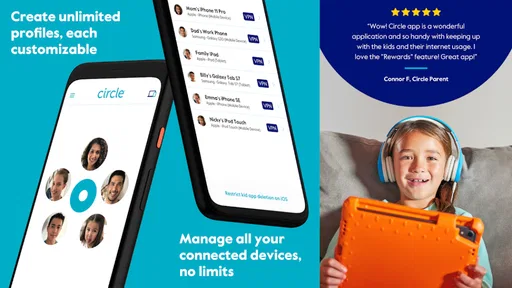
One of the first things I noticed was the user-friendly interface. Everything is laid out logically, so even if you’re not tech-savvy, you’ll find your way around without much fuss. You can set up profiles for each family member, which is super handy. This means you can customize settings based on age or individual needs, giving you more control over what each person can access.
Motor and sensory considerations
For a parent who finds small controls, dense menus, or repeated device handling tiring, the most useful parts of Circle are the actions that seem direct: adjusting a family profile, changing a time limit, or pausing internet access. I would still make the first setup session a calm one, with the parent’s phone charged and the relevant household details at hand. A parental-control setup is easier to review when there is time to read each setting rather than tap through it under pressure.
There is also a sensory and emotional side to screen rules. A sudden pause during a video or game can be startling, especially for a younger child or someone who struggles with abrupt transitions. I would use the app’s controls alongside a spoken warning, a visual reminder, or a consistent family routine, rather than expecting a timer alone to make the change feel fair. The tool can enforce a boundary, but it cannot explain the reason in a reassuring way.
Features Galore
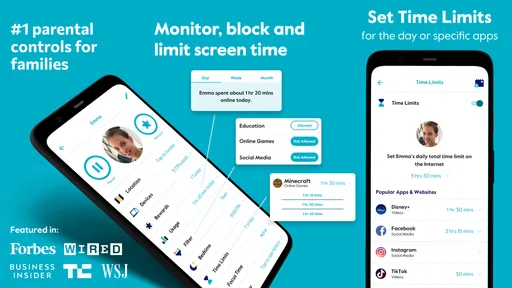
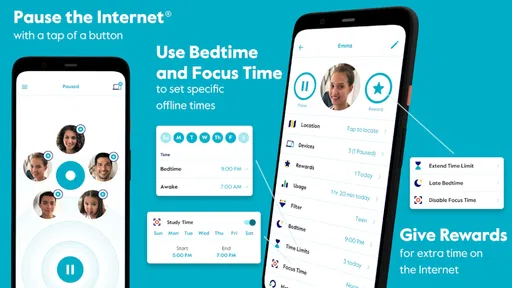
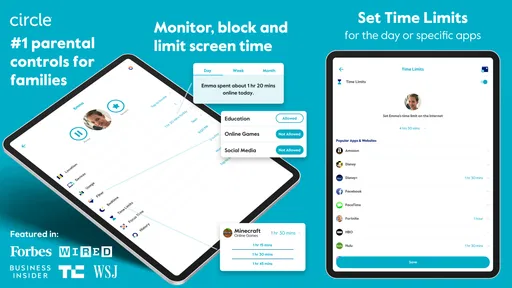
Circle isn’t just about cutting off access. It’s about creating a balanced digital lifestyle. You can set daily time limits for specific apps or categories like social media or games. This feature is a game-changer for parents trying to manage their kids’ screen time without constant arguments. The app also allows you to set bedtime restrictions, ensuring devices go to sleep when your kids do.
Another fantastic feature is the ability to pause the internet. Having a family dinner? Just hit the pause button, and voilà, instant digital detox. It’s perfect for those moments when you need everyone’s undivided attention. Plus, you can reward good behavior with extra screen time, a feature that’s become a favorite in my household.
Situational access and practical routines
The pause control is particularly suited to a short, shared moment: dinner, homework that needs concentration, or a family conversation. I would not treat it as a substitute for a carefully agreed schedule, though. If a child is in the middle of a school task or a call, an abrupt interruption can create more friction than it saves. A quick verbal heads-up helps make the pause feel like a household cue rather than an unexplained technical failure.
A realistic routine might look like this: before dinner, I tell the children that the internet will be paused when everyone sits down, then use the control once they are ready. If one child needs extra time for a specific reason, the profile-based setup gives me a way to think about that child’s needs instead of applying one rule to everyone. The useful insight is to reserve the pause for moments when the whole family understands what it means, and use time limits or bedtime restrictions for recurring boundaries.
Compared with relying only on a device’s built-in screen-time settings, Circle’s appeal is the family-level view and the ability to manage household access from a parent-facing app. Built-in controls may be a better fit if you only need to limit one child’s device and prefer not to connect rules to the home network. A router-level control can suit families who want broad household filtering, but it may be less convenient when rules need to differ by child. Circle sits between those approaches: its profiles and time controls aim to make family rules more specific, while the Wi-Fi pairing means setup and connectivity are part of the experience.
Insights and Reports
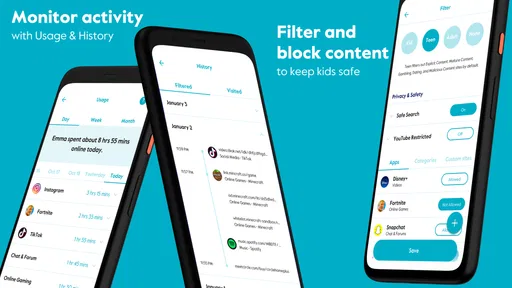
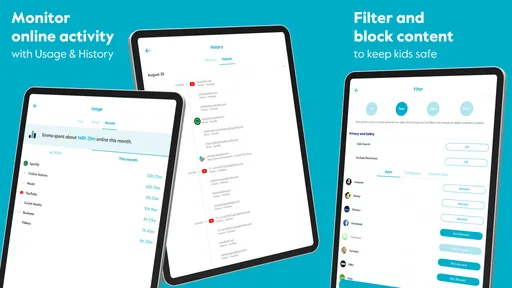
Circle offers insightful reports that give you a clear picture of how much time your kids are spending online and what they’re doing. The usage reports are detailed, showing time spent on each app or website. It’s eye-opening to see where all those hours are going, and it provides a great starting point for conversations about healthy digital habits.
What I particularly appreciate is the real-time location tracking feature. It provides peace of mind, knowing where your kids are and ensuring they’re safe. In today’s world, that’s priceless.
I would use reports as conversation starters, not as a scorecard. A sudden rise in time on one service can have a simple explanation, such as a new interest or a school-related task, and a usage summary cannot tell you the whole story by itself. Looking at patterns together can help a parent ask better questions: what is the child doing online, when do they feel ready to stop, and which limits seem reasonable? That approach makes monitoring more transparent and less likely to feel like secret surveillance.
Location tools deserve the same care. They may be reassuring in a situation where a parent needs to check where a child is, but they are not a replacement for direct communication or an emergency plan. I would explain clearly when and why location is being used, especially with older children. Trust is part of family safety, and a tracking feature works best when it supports that trust rather than quietly undermining it.
Room for Improvement
While Circle is packed with features, there’s always room for improvement. For instance, some users have mentioned occasional connectivity issues. During my testing, I did experience a couple of dropouts, but they were rare and quickly resolved. It’s also worth noting that some advanced features require a subscription, which might be a downside for those looking for a completely free solution.
Despite these minor hiccups, the app remains a robust tool for managing your family’s screen time. The ongoing updates and improvements show that the team is committed to making the app even better.
Remaining barriers and who should look elsewhere
The main trade-off is that a tool built around household Wi-Fi may not cover every situation equally well. A child who spends much of the day away from home, switches between networks, or uses devices in settings the parent does not manage may need a different mix of controls. Before paying for optional features, I would check whether Circle’s setup fits the devices and routines the family actually uses, then test a small rule and see whether it behaves as expected.
It is also not the right choice for every parenting style. If you want a lightweight way to agree on limits together and your child is old enough to manage their own device responsibly, a conversation and built-in device settings may be simpler. If you need controls that work consistently across many locations, compare the options carefully rather than assuming a home-focused setup will cover them all. Circle is most compelling when a parent wants one place to set family profiles, time boundaries, and occasional internet pauses, and is willing to stay involved in how those rules are explained.
Accessibility in practice depends on the people using the app as much as the interface. A parent who prefers clear, repeatable routines may appreciate having rules gathered around profiles, while a household needing highly individualized support should take time to check whether the available controls match each person’s needs. I would avoid promising a child that any control will solve every conflict; a tool can reduce repeated reminders, but it cannot replace flexibility, context, or a calm explanation when plans change.
The Verdict
All in all, the Circle Parental Controls App is a must-have for any parent looking to navigate the digital world with ease. It’s intuitive, packed with features, and genuinely helps in creating a balanced digital environment for the whole family. While it’s not perfect, the pros far outweigh the cons. If you’re on the fence, I’d say give it a shot. You might just find it becomes an invaluable part of your parenting toolkit.
Looking to regain control over your family’s screen time? Download the app today and start your journey towards a healthier digital life. Who knows, you might even find some extra quality time together. And isn’t that what it’s all about?
An inclusive verdict for different families
Circle was released on April 10, 2019, and its combination of profiles, limits, reports, bedtime restrictions, and pause controls gives parents several ways to shape household routines. I see it as a better fit for caregivers who want active oversight and are comfortable discussing digital rules with their children than for people looking for a silent, set-and-forget filter. Its free starting point makes it possible to explore the app, but the optional purchases and mixed user rating are reasons to approach it thoughtfully rather than assume every household will find the same experience.
My practical recommendation is to begin with one child profile and one boundary that solves a recurring problem, then review how it affects the family before adding more. Ask whether the rule is easy for the parent to manage, understandable to the child, and flexible enough for schoolwork, shared devices, and changing plans. If those answers are yes, Circle can help make screen-time expectations more consistent. If the setup feels like another source of stress, or the family mainly needs controls away from home, a simpler device-level option may be the more inclusive choice.
Verdict
Strengths of Circle Parental Controls App
- Easy-to-use interface for all ages.
- Comprehensive content filtering options.
- Real-time location tracking feature.
- Customizable screen time limits.
- Affordable premium subscription.
Limitations of Circle Parental Controls App
- Limited features in free version.
- Occasional app connectivity issues.
- Device compatibility varies.
- Can be bypassed by tech-savvy kids.
- Some features require additional setup.
Other Releases by Aura Sub LLC
View All
Aura: Security & Protection
Finance4.5

Circle 1st generation
Lifestyle1.7
Similar Picks in This Category
View All
Family Space
Motorola Mobility LLC.3.9

شرطة الأطفال - مكالمة وهمية
Oub Apps4.1

Findmykids: Parental Control
LETEM LTD4.6

Pregnancy + | Tracker App
Philips Electronics UK Limited4.8

Policía de niños - para padres
Kids police4.7

Pregnancy App
Amila4.9
Frequently Asked Questions
What is Circle Parental Controls App, and how does it work?
Circle Parental Controls App is a tool designed to help parents manage their children's internet usage across multiple devices. By connecting to your home Wi-Fi, it allows you to set filters, screen time limits, and monitor online activity. It provides a user-friendly interface where you can customize settings for each family member.
Is Circle Parental Controls App compatible with all devices?
Yes, Circle Parental Controls App is compatible with both Android and iOS devices. It works across smartphones, tablets, and even laptops, ensuring comprehensive coverage. However, ensure your home Wi-Fi is compatible, as the app requires a stable connection to function correctly across all devices.
What features does Circle Parental Controls App offer?
Circle Parental Controls App offers a range of features, including screen time management, internet filtering, and activity monitoring. Parents can set daily time limits, pause internet access, and track usage across different platforms. The app also allows you to set age-appropriate filters for different family members.
How secure is the Circle Parental Controls App?
Circle Parental Controls App prioritizes security by offering encrypted connections and regular updates to protect user data. It requires password authentication for parental controls, ensuring that only authorized users can modify settings. Additionally, the app complies with data protection regulations to maintain user privacy.
Can I manage Circle Parental Controls remotely?
Yes, Circle Parental Controls App allows remote management through its mobile app. Parents can make changes to settings, monitor activity, and receive notifications from anywhere. This flexibility ensures that you can stay informed and in control of your child’s internet activity even when you’re not at home.
